
I have a couple of Ubiquity APs in my home and have an instance of PRTG running. I was looking for a good way to monitor the access points.
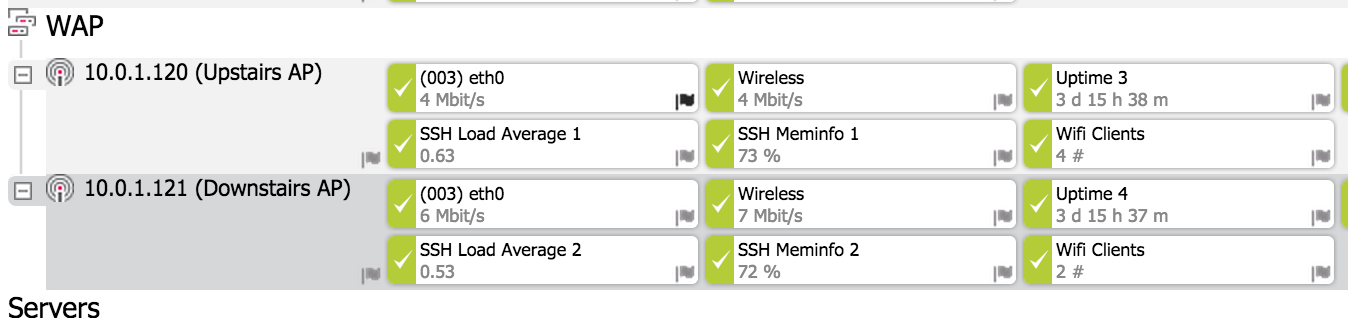
Out of the box Ubquiti supports SNMP and SSH. I wanted a way to monitor how many clients are connected. If you want to monitor the access points configure SNMP on the device, feed the string in to PRTG and the SSH credentials.
Then I wrote a simple shell script below that extracts information from the mca-dump table for connected clients. I’m sure there are different and probably more efficient ways to do this, but this works for me. Essentially the code greps the number and formats the return correctly for PRTG to read, including a status code.
1) Create the directory /var/prtg/scripts/
2) Using VI on the access point create the following file with the code below in /var/prtg/scripts/
3) Save it as wifiusers.sh
4) Add a custom SSH sensor for your access point.(I called mine Wifi Clients)
5) Set the primary channel to “Value (#)”
|
Hello
Create Blog. Thx
I am able to create the dir and the File. Put I dont see the File in the SSH Script Sensor Typ. The Dropdown is empty.
Have yo any hints?
Andy
give the script execute permissions maybe? chmod +x /var/prtg/scripts/wifiusers.sh
Hi,
Thank you for that guide !
I have adapted it for NSM5 :
nbusers=`mca-status | grep wlanConnections | tail -n1 | sed ‘s/[^0-9]*//g`
echo 0:$nbusers:users
I search to catch bandwidth.
Can you say my how you do that ?
Thanks !
Another question. After an AP reboot, all date are erased (in /var/prtg/…). How have you do to underpass that ?
I haven’t put anything else into this for about a year now. If I recall it did get erased after a reboot or firmware upgrade, but the APs were very stable and rarely needed to be reboot. Bandwidth monitoring is native via an SNMP scan in PRTG.