
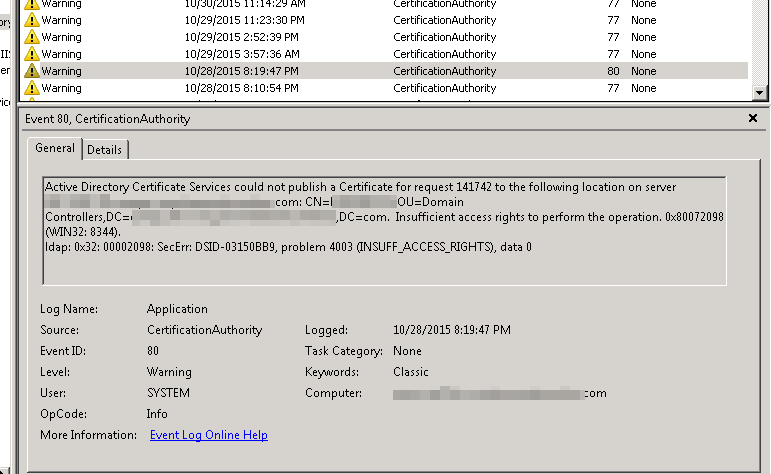
After upgrading from a 2003 to 2008 R2 certification authorities I noticed warnings for event ID 80 in the CA logs. I think I have the fix worked out. Essentially you need to convert global groups to universal then to domain local. Add the CA computer objects, then set some permissions.
Replace the paths with your domain specific information.
1) On the parent domain, on a global catalog domain controller (Run from an elevated cmd prompt)
dsmod group "CN=Cert Publishers,CN=Users,DC=domain,DC=company,DC=com" -scope u
dsmod group "CN=Cert Publishers,CN=Users,DC=domain,DC=company,DC=com" -scope l
2) For each child domains, on a global catalog domain controller (Run from an elevated cmd prompt)
dsmod group "CN=Cert Publishers,CN=Users,DC=child,DC=domain,DC=company,DC=com" -scope u
dsmod group "CN=Cert Publishers,CN=Users,DC=child,DC=domain,DC=company,DC=com" -scope l
dsacls "DC=child,DC=domain,DC=company,DC=com" /I:S /G "domain\Cert Publishers":RP;userCertificate
dsacls "DC=child,DC=domain,DC=company,DC=com" /I:S /G "domain\Cert Publishers":WP;userCertificate
dsacls "cn=adminsdholder,cn=system,DC=child,DC=domain,DC=company,DC=com" /G "domain\Cert Publishers":RP;userCertificate
dsacls "cn=adminsdholder,cn=system,DC=child,DC=domain,DC=company,DC=com" /G "domain\Cert Publishers":WP;userCertificate
3) Add the computer objects for your certification authorities to the group “Cert Publishers” on each domain.
4) Finally, on your certification authorities run the following ((Run from an elevated cmd prompt))
certutil -setreg SetupStatus -SETUP_DCOM_SECURITY_UPDATED_FLAG
net stop certsvc
net start certsvc